Pakistani Passport & NADRA Photo Size Guide: 35×45 mm 300 DPI Specifications
Need a compliant passport, visa, or national ID photo fast? Using our passport size photo maker online free, you can remove backgrounds automatically with AI, select official country dimensions, and download print-ready sheets at 300 DPI with zero watermarks.
Looking for a reliable passport size photo maker online free to create official biometric portraits without visiting an expensive photo studio? Whether applying for a Pakistan NADRA CNIC or passport, an Indian passport or OCI card, a US green card, or a European Schengen visa, submitting an incorrect photo leads to delays and rejected applications. Compixor provides a modern, fast, and completely free online passport size photo maker directly in your browser. With automated AI background removal, official millimeter country presets, and print-ready sheets at 300 DPI, you can make your passport photo now in under 60 seconds with zero watermarks and no registration required.
100% In-Browser • Zero File Uploads
Try the Free Passport Photo Maker
Why Use an Online Passport Size Photo Maker?
Traditional studio portrait services are inconvenient, time-consuming, and surprisingly costly. Local pharmacies and commercial studios frequently charge $15 to $25 for a single strip of two prints, often requiring appointments and lengthy waiting lines. Conversely, trying to crop smartphone selfies manually using standard picture editors often results in rejected documents due to distorted aspect ratios, improper face-to-frame ratios, incorrect background hues, or blurry low-resolution files. A dedicated passport photo size maker online free solves these frustrations. In the interactive comparison above, examine how a casual smartphone selfie taken in a living room with uneven shadows, cluttered wall patterns, and a tilted head is transformed into an official biometric portrait. Our intelligent matting engine isolates delicate hair strands, removes harsh ambient room shadows, neutralizes color fringing, and re-centers the subject according to international ICAO standards. With Compixor, your portrait is processed in memory to create your result and is never stored on external servers, while users wanting additional isolation can enable the optional on-device browser mode. You receive instant, studio-grade background segmentation, exact government millimeter presets, and high-resolution 300 DPI downloads. Unlike many online tools that place intrusive watermarks or require paid subscriptions before releasing your files, Compixor offers clean, full-resolution JPEG exports and print sheets with zero sign-up friction.
See the Difference: Casual Portrait to Official Passport Photo
Drag the interactive slider below to inspect how our AI engine isolates individual hair strands, removes the backdrop, and prepares official government-compliant portraits in real time.
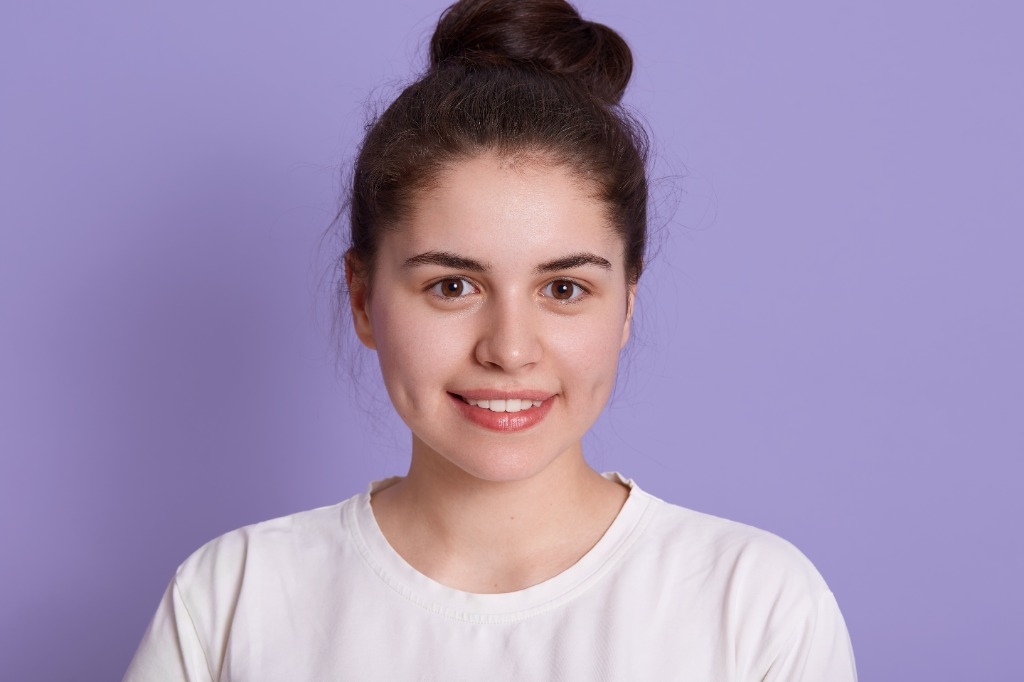
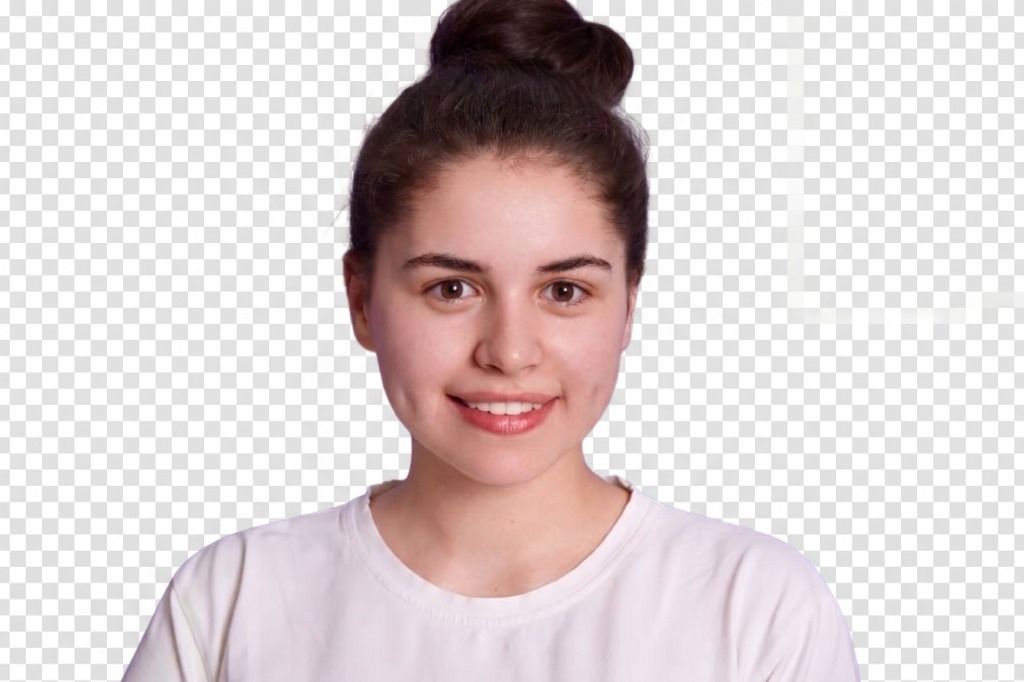
Zero Fringe Halos & Natural Hair Transparency
Our AI uses morphological edge smoothing and de-halo filtering to preserve fine hair details while cleanly segmenting the subject.
- Distracting colored background, shadows, and wall textures
- Inconsistent head proportions (often rejected by automated visa gates)
- Uneven ambient color bleed onto clothing and shoulders
- Clean isolated subject ready for official passport backdrops
- Exact biometric eye axis and chin-to-crown proportions
- Sharp 300 DPI ready for automated online portals & photo printing
Strict Privacy Architecture — Zero Photo Retention
AI background removal runs in volatile memory over HTTPS and is never stored on disk. You can also select private on-device processing.
- ✓Instant In-Browser Speed: Transform a simple smartphone portrait into a compliant biometric portrait in less than 60 seconds.
- ✓Detailed Portrait Transformation: Automatically corrects tilted posture, removes room background clutter, and balances facial illumination.
- ✓No Login & No Signup: Access all editing tools, background swatches, and export formats immediately without creating an account or entering an email.
- ✓Zero Watermarks: Download clean, professional ID prints without branding stamps, promotional logos, or payment walls.
- ✓Strict In-Memory Privacy: Your image is used only to create your result and is discarded immediately after processing.
- ✓Studio-Grade 300 DPI Prints: Export individual digital portraits or tiled sheets with corner crop marks ready for scissors or rotary cutters.
How to Make a Passport Size Photo Online Free (Step by Step)
Creating an official ID portrait from home is straightforward when you follow our step-by-step workflow. Use this ordered guide to prepare your picture with our free passport size photo maker:
- 1Take a Clear Smartphone Portrait: Stand approximately 4 to 5 feet away from your camera in bright, indirect natural daylight facing a window. Keep your shoulders square to the lens, look straight ahead with a neutral facial expression (mouth closed, eyes open and clearly visible), and avoid wearing tinted glasses or decorative headwear.
- 2Upload Your Photo to Compixor: Open our passport size photo maker AI online free and drop your image into the workspace. The intelligent matting model automatically isolates you from your existing environment in seconds.
- 3Choose Your Country & Document Preset: Select your destination from our verified presets, including Pakistan Passport / NADRA (35 × 45 mm), India Passport / OCI (51 × 51 mm / 2 × 2 inches), US Visa, UK / Schengen, Canada, or Australia.
- 4Select Your Required Background Colour: Pick official plain white, off-white, light blue, sky blue, or royal blue depending on your issuing authority's specific consular rules.
- 5Align Facial Proportions with Biometric Overlay Guides: Turn on the biometric overlay tool to ensure your chin rests along the chin guide and the crown of your head fits within the required percentage boundary (such as 70% to 80% for Pakistan and India). Adjust zoom and rotation as needed.
- 6Download Your Photo or Print Sheet: Export a high-resolution individual JPEG for digital government portals (including under 50 KB for online portals) or select a tiled print sheet (A4, A5 with 6 photos, or A6 with 2 photos) with calibrated cut marks and 300 DPI metadata ready for home printing.
Passport Photo with White Background, Blue Background, or Any Colour
Consular authorities enforce strict rules regarding background color. Submitting an off-white picture to an embassy requiring royal blue, or a patterned wall texture to an agency requiring pure white, causes automatic rejection. Compixor's passport size photo maker with white background and with blue background features let you switch to official color swatches in a single click. Our smart portrait matting cleanly separates complex hair strands, ears, and clothing contours without leaving jagged halos or color bleeding. High-quality matting recalculates RGB values for semi-transparent boundary pixels and applies 0.5 to 1.0 sub-pixel edge feathering, allowing natural blending against high-contrast pure white (#ffffff) or consular light blue backdrops. Once isolated, you can choose from verified consular palettes:
- ✓Pure White (#FFFFFF): Mandated for US Passports and Visas, Indian Passports, OCI Cards, Canadian Passports, Australian Passports, and UAE Visas.
- ✓Light Blue (#E0F2FE) & Sky Blue (#438EDB): Officially permitted and widely used for Pakistan MRP Passports and NADRA CNIC / NICOP identity cards.
- ✓Royal Blue (#1D4ED8): Standard requirement for Philippines Passports and specific Southeast Asian consular documents.
- ✓Light Gray / Off-White (#F1F5F9 / #F8FAFC): Accepted across UK HM Passport Office and European Schengen visa jurisdictions to prevent high-contrast glare.
- ✓Foreground Color Reconstruction: Neutralizes original wall tones around flyaway hair strands to avoid unnatural edge fringing over pure white.
- ✓Contrast Clothing Rule: Wear a dark suit jacket, navy blazer, or rich color shirt to provide sharp separation from white and light blue backdrops.
Passport Photo Sizes by Country
Embassy and visa office specifications vary considerably around the world. A standard 2x2 inch American portrait will not be accepted for a European Schengen visa, and a 35x45 mm print will not fit an Indian passport submission form. Review the verified dimensions below before exporting your document from our passport photo size maker online free:
| Country / Authority | Standard Dimensions | Pixel Resolution (300 DPI) | Official Background | Biometric Head Height |
|---|---|---|---|---|
| Pakistan Passport & NADRA CNIC | 35 × 45 mm | 413 × 531 px | Light Blue (#e0f2fe) or White | 32–36 mm (70–80%) |
| India Passport / OCI / Visa | 51 × 51 mm (2 × 2 in) | 600 × 600 px | Pure White (#ffffff) | 35–40 mm (70–80%) |
| United States (Passport / Visa) | 51 × 51 mm (2 × 2 in) | 600 × 600 px | Pure White (#ffffff) | 25–35 mm (50–69%) |
| UK, Schengen & EU Countries | 35 × 45 mm | 413 × 531 px | Light Gray or Plain White | 29–34 mm (65–76%) |
| Canada Passport | 50 × 70 mm | 590 × 826 px | Plain White or Light Gray | 31–36 mm (44–51%) |
| Philippines Passport | 35 × 45 mm | 413 × 531 px | Royal Blue (#1d4ed8) | 30–35 mm (67–78%) |
| China Passport | 33 × 48 mm | 390 × 567 px | Plain White or Blue | 28–33 mm (58–68%) |
| Australia Passport | 35 × 45 mm | 413 × 531 px | Plain White or Light Gray | 32–36 mm (71–80%) |
| UAE & Gulf Visa | 40 × 60 mm | 472 × 708 px | Plain White | 30–38 mm (60–70%) |
Print Passport Photos on an A4 Sheet
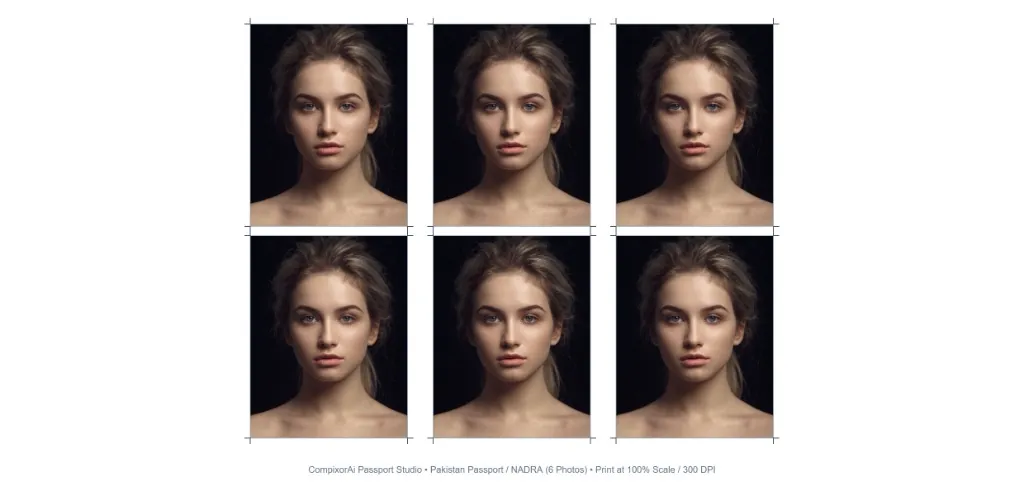
When you need physical prints for paper application forms, paying a local center to print an individual 2x2 portrait often triggers high surcharges. A much more economical approach is to print multiple ID pictures on one A4 page or a standard postcard sheet, then cut them yourself using sharp scissors or a paper trimmer. Take a close look at our verified sample output below. The sample illustrates a real A5 print sheet (148 × 210 mm) generated with Compixor's Passport Photo Maker for Pakistan Passport / NADRA (35 × 45 mm): • 3 × 2 Balanced Grid: Six identical, razor-sharp 300 DPI portraits are arranged with uniform 2.5 mm gutters and a protective 5 mm outer perimeter margin, ensuring no print heads clip image borders. • Precise Hairline Crosshair Cut Marks: Notice the delicate black crop ticks positioned at each corner of every portrait. These crosshairs provide an exact alignment path for your steel ruler and utility knife, eliminating guesswork. • Official Pakistani NADRA Blue Backdrop: Each cutout displays the standardized light blue (#e0f2fe) consular background with pristine edge separation around hair contours and dark suit lapels. • Embedded 300 DPI JFIF Metadata: Printers interpret the physical millimeter values directly from file headers, ensuring each individual cutout measures precisely 35 mm wide by 45 mm high when printed at 100% scale. Compixor includes built-in studio print sheets engineered to exact physical millimeter dimensions at 300 DPI. Each layout includes hairline corner crop marks so you can slice straight edges without measuring by hand:
- ✓Full A4 Page Layout: Tiles multiple rows and columns across standard A4 paper (210 × 297 mm), allowing you to print dozens of copies in a single run.
- ✓3 per A4 Strip: Arranges a compact row of pictures across standard paper, ideal when you only need a few copies for immediate submission.
- ✓A5 Sheet (6 Photos): Generates a 6 passport size photo maker layout (arranged in a 3 × 2 grid) on A5 paper (148 × 210 mm) with 2.5 mm gutters and outer crop marks.
- ✓A6 Sheet (2 Photos): Places 2 passport photos side-by-side on compact A6 paper (105 × 148 mm), suitable for standard small-format photo printers.
- ✓Embedded 300 DPI Metadata: Every exported JPEG includes standard JFIF 300 DPI tags, and vector PDF exports embed high-resolution portraits at exact millimeter coordinates so printers reproduce true physical dimensions without scaling errors.
- ✓Crucial 100% Scale Rule: When printing at home or a local print shop, always select 'Actual Size' or '100% Scale' in your printer preferences dialog. Never select 'Fit to Page' or 'Shrink to Printable Area', which distorts physical millimeter dimensions and leads to immediate rejection at passport counters.
- ✓Photo Paper Selection: For official submission, print on 200–260 GSM semi-gloss, pearl, or satin photo paper. Standard 80 GSM copy paper wrinkles under ink and will be rejected by immigration counters.
Tips for a Photo That Won't Be Rejected
Biometric screening software used by passport authorities automatically flags improper portraits. To guarantee high acceptance rates for Pakistan NADRA, Indian Passport Seva, US State Department, and global embassies, keep these essential practical tips in mind:
- ✓Even Facial Lighting: Face a window with soft, diffused daylight. Avoid directional lamps or harsh sunlight that cast dark shadows under your eyes, nose, or chin.
- ✓Neutral Expression: Look directly into the camera lens with both eyes open, eyebrows relaxed, and lips closed. Natural smiles with visible teeth or tilted heads are common rejection reasons.
- ✓Direct Eye Contact & Camera Height: Position your phone at eye level 4 to 5 feet away. Looking upward or downward alters facial geometry and distorts biometric measurements.
- ✓Eyeglasses & Glare: Remove glasses before taking the shot. Even non-prescription lenses can produce flash reflections or obscure eye contours.
- ✓Religious Headwear: Religious head coverings such as hijabs, dupattas, turbans, or yarmulkes are permitted by NADRA, US State Dept, and global embassies, provided the entire facial oval—from the tip of the chin to the top of the forehead and both cheek contours—is unobstructed.
- ✓Contrasting Clothing: Wear everyday clothing that contrasts with your background (for example, wear dark clothing against white or light blue backgrounds) so your shoulders remain clearly visible.
Frequently Asked Questions
Common questions regarding online passport photo creation, background changes, printing, and official embassy acceptance:
Final Thoughts: Create Your Passport Photo Today
Creating a compliant, print-ready passport or visa portrait no longer requires driving to an expensive studio or waiting in line. With Compixor's passport size photo maker online free, you can take a quick portrait on your smartphone, remove the background with AI, calibrate official Pakistan NADRA, Indian, US, or European dimensions, and download single 300 DPI photos or tiled print sheets in seconds. Enjoy a fast, zero-friction experience with no sign-up, no hidden fees, and no watermarks. Whether you need a digital upload for an online portal or an A4 print sheet for physical submission, try our free passport photo maker now and get your verified passport photo in under 60 seconds.
Experience Free Passport Photo Maker
Zero file uploads, no watermarks, and no sign-up required. Your files remain completely secure in device RAM.
Launch Tool in BrowserReady to test it yourself?
Process your files locally in your browser with zero limits, zero watermarks, and complete privacy.

Haroon Ali
Written by Haroon Ali • Compixor AI Editorial