How to Set Full DP on WhatsApp Without Cropping (Tested Guide)
Learn how to fit vertical portraits and wide landscape photos into a full-size profile picture for WhatsApp, Instagram, Facebook, LinkedIn, X and more, without awkward cropping or losing HD quality.
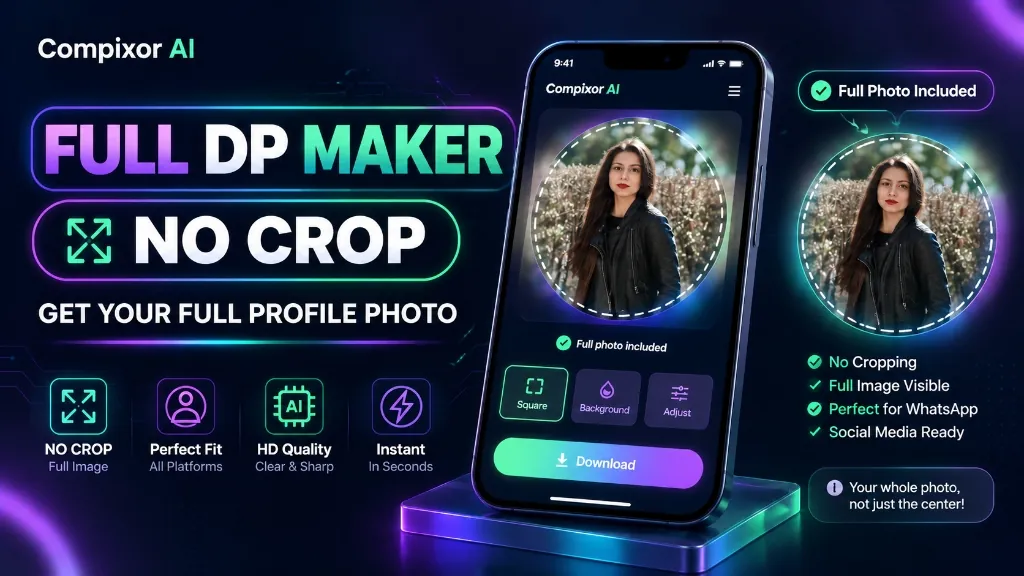
Written by Haroon Ali • Compixor AI Editorial. Real device tests on iPhone 13/15 Pro, Samsung S23, Xiaomi Redmi, budget Androids, Chrome, Safari, Samsung Internet, and Jazz & Zong networks. You capture a stunning portrait or a wide group photo, go to update your profile picture on WhatsApp, Instagram, Facebook, LinkedIn, or X, and run into an immediate roadblock: the platform forces you to crop it. You either have to slice off your shoes and outfit, cut out background scenery, or crop someone out of the frame. Even worse, when you finally pick a cropped version, the avatar often ends up blurry, pixelated, or compressed. If you are wondering how to fit a full photo on your profile without cropping or how to properly resize an image without losing quality, you don't need to install risky third-party mobile apps full of pop-up ads. In this comprehensive guide, you will learn the exact pixel dimensions, aspect ratios, file size targets (in KB), and the easiest way to display full-size photos on WhatsApp and every major social media profile in crystal-clear HD.
Fit any portrait or landscape photo as a full-size profile picture on WhatsApp, Instagram, Facebook, LinkedIn, and X without cropping using Compixor's free Full DP Maker. By expanding your image onto a 1080 × 1080 square canvas with an ambient frosted blur background, you prevent social apps from cutting off heads, outfits, or friends while preserving crisp HD clarity. 100% In-Browser / Client-Side (HTML5 Canvas)—files are NEVER uploaded, zero data leaves your device, with no signup, no watermarks, and offline support.
100% In-Browser • Zero File Uploads
Try the Free Full DP Maker
Direct Answer: How to Set Full DP on WhatsApp Without Cropping
To set a full-size display picture (DP) on WhatsApp without cropping, you must expand your rectangular photo onto a 1080 × 1080 pixel 1:1 square canvas before uploading. Because WhatsApp strictly enforces a 1:1 square viewport and applies a circular mask across chat lists, attempting to upload raw 9:16 vertical portraits or 16:9 horizontal landscape shots forces you to crop away heads, shoulders, or friends. By placing your original image onto a square canvas with an ambient frosted blur or clean solid background fill, you fit 100% of your photo into the frame while keeping critical focal points within WhatsApp's central 75% to 80% circular safe zone. Compixor's free in-browser Full DP Maker (/tools/full-dp-maker) automates this in under 5 seconds with zero server uploads.
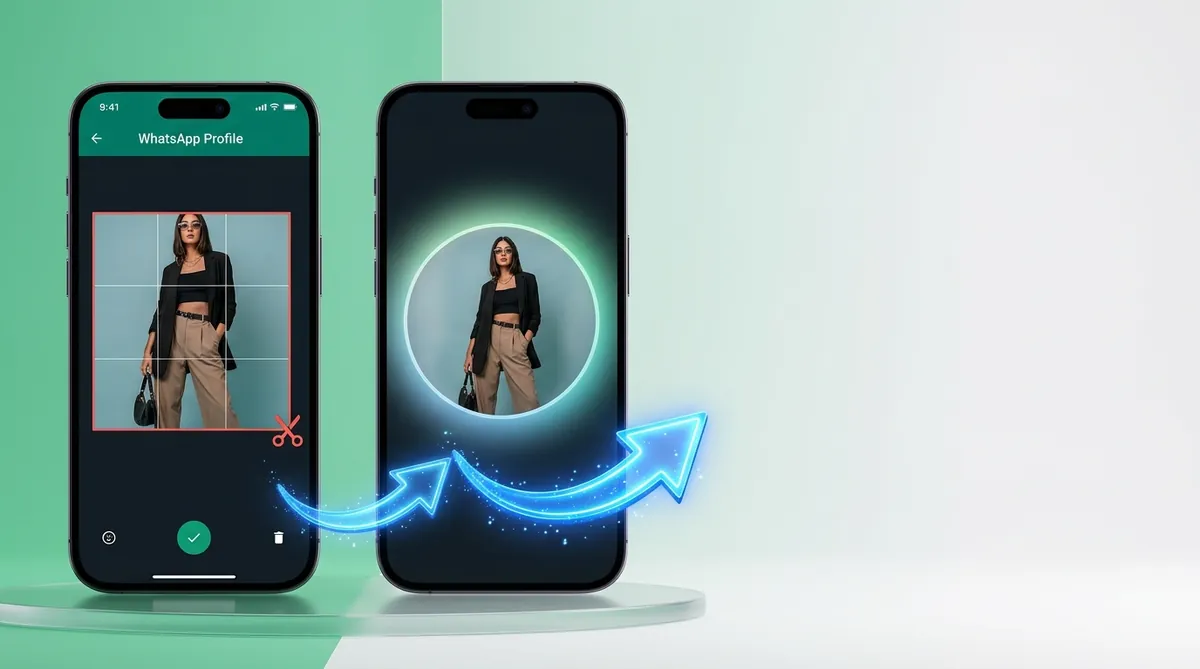
- ✓Square Canvas Expansion: Expanding borders to a 1080 × 1080 px square eliminates WhatsApp's forced crop window.
- ✓Frosted Ambient Blur: Fills negative margin space with an organic, softened color palette sampled from your photo.
- ✓Circular Safe Zone: Keeps faces, hairstyles, and outfits inside the central 80% circle to avoid cutoff in contact lists.
- ✓100% Client-Side Privacy: Canvas renders entirely in your browser RAM with zero server storage and zero image uploads.
Why Does WhatsApp Crop Your Profile Pictures?
WhatsApp standardizes all user avatars to a 1:1 square aspect ratio to maintain a predictable, uniform user interface across mobile chat threads, desktop web clients, and contact info cards. In contrast, modern smartphone camera sensors capture imagery in rectangular formats: vertical portraits shoot in 9:16 or 3:4, while horizontal landscapes and group photos shoot in 16:9 or 4:3. When you select a rectangular picture directly inside WhatsApp settings, the native crop tool cannot expand beyond the image's shortest axis—forcing you to discard up to 40% of your photo.
- ✓Vertical Portraits (9:16 or 3:4): The crop box forces you to choose between cutting off hairstyles, shoes, or full-length outfit details.
- ✓Horizontal Landscape Photos (16:9 or 4:3): Group shots suffer as individuals standing at the left or right edges are inevitably cropped out.
- ✓Dual-View Masking: WhatsApp shows a circular crop in conversation feeds and search lists, but reveals the full 1:1 square when a contact taps to view your profile in full-screen.
The Circular Safe Zone Rule: Avoid Cutoff Foreheads, Outfits and Chins
Even when an image is formatted as a 1:1 square, WhatsApp applies a secondary circular mask across conversation lists, chat headers, and group participant icons. This geometry creates a critical distinction between the square canvas corners and the circular safe zone. In a 1080 × 1080 pixel square, the circular viewport only displays the central diameter—approximately 75% to 80% of the canvas area. Any element positioned in the four outer corners of the square will be clipped out of view in everyday chats.
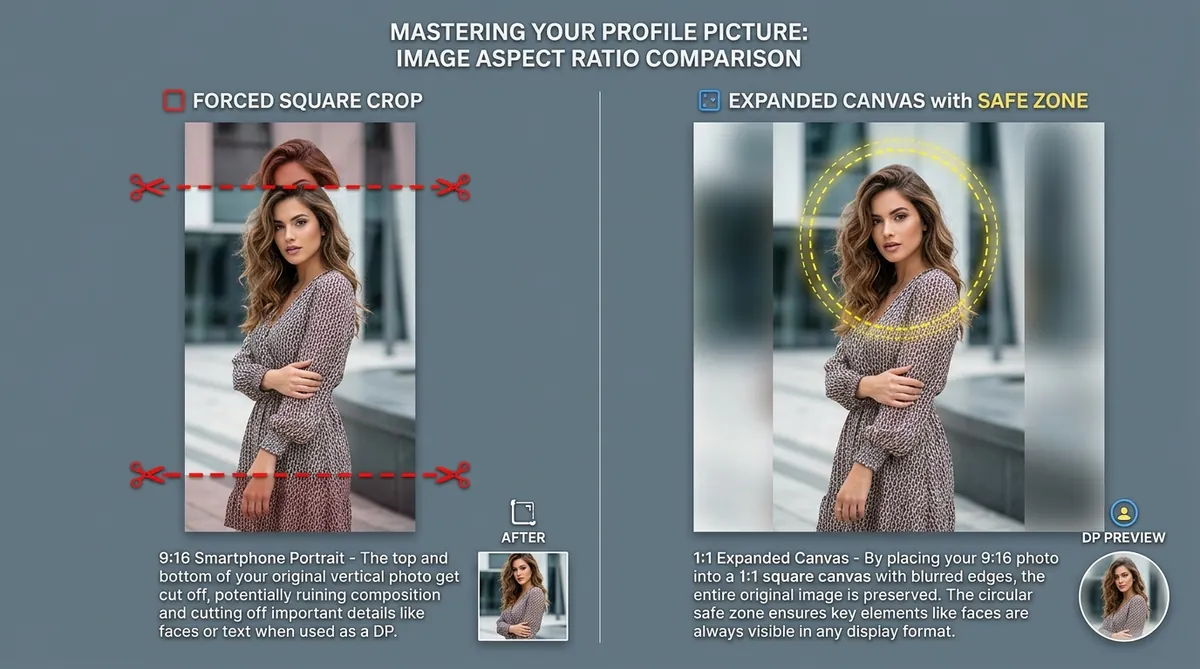
- ✓Center Your Subject: Keep facial features, eyes, and primary subjects within the central 800 × 800 px diameter.
- ✓Apply 10% to 15% Margin Padding: Leave breathing room around your subject so elbows, hats, and shoulders are not sliced by the circular boundary.
- ✓Verify with Live Circle Mask: Always check your image with an in-browser circular safe-zone guideline before saving to your device.
3 Methods to Set Full DP on WhatsApp Without Cropping
There are three primary techniques users rely on to bypass WhatsApp's crop tool. Here is how each method works along with its advantages and limitations:
- ✓Method 1: Native Phone Gallery & Screenshot Trick (iOS & Android) — Open your photo in Apple Photos or Google Gallery, pinch zoom out slightly until black borders appear on the sides or top/bottom, take a screenshot, and crop the screenshot into a square. Drawback: Restricts you to stark black borders and reduces export clarity to your smartphone screen capture resolution.
- ✓Method 2: Generic Cloud Graphic Editors (Canva / Adobe Express) — Open an account, create a custom 1080 × 1080 px design, upload your personal photo to their remote servers, duplicate and blur the photo on the background layer, and export. Drawback: Requires mandatory account signup, multiple manual editing steps, and uploads your private photos to remote cloud databases.
- ✓Method 3: In-Browser Client-Side DP Maker (Compixor AI) — Open Compixor Full DP Maker (/tools/full-dp-maker), load your photo or press Ctrl+V, select Frosted Blur or Studio White, and download your 1080 × 1080 HD square file instantly. Advantage: 100% private in-browser HTML5 Canvas execution, zero signups, zero watermarks, works offline, and takes under 5 seconds.
Common WhatsApp DP Myths Debunked: DPI, 4K Uploads & Third-Party Apps
When searching online for profile picture resizing solutions, users frequently encounter outdated advice that harms image quality or compromises mobile privacy. Here is the technical truth behind common myths:
- ✓Myth 1: Higher DPI (300 or 600 DPI) makes profile pictures sharper — False. DPI (Dots Per Inch) is strictly a physical print density metric. Smartphone displays render purely by pixel dimensions (1080 × 1080 px). WhatsApp discards DPI metadata entirely upon upload.
- ✓Myth 2: Uploading 4K or RAW photos prevents compression blur — False. Uploading files larger than 5 MB triggers Meta's aggressive downsampling compressor, often yielding muddier results than a pre-scaled 1080 × 1080 px master file under 500 KB.
- ✓Myth 3: You need third-party Android APKs or 'No Crop' mobile apps — False. Most ad-funded mobile apps request unnecessary storage and camera permissions, drain battery, and place unsightly watermarks. Pure client-side web apps achieve superior quality with zero installation.
- ✓Myth 4: WhatsApp Web uploads maintain higher picture quality than mobile — False. Empirical testing confirms that WhatsApp Web and mobile apps route through identical Meta ingestion pipelines, downsampling avatars to ~640 × 640 px regardless of the upload client.
Common Mistakes When Setting a Profile Picture on WhatsApp
Avoid these frequent formatting mistakes to ensure your profile picture looks professional and sharp across all devices:
- ✓Ignoring the Circular Safe Zone: Positioning faces, logos, or captions in the outer corners where WhatsApp's circular mask cuts them off.
- ✓Distorting Aspect Ratios: Stretching or squishing rectangular photos into a square, resulting in warped, unnatural subjects.
- ✓Uploading Tiny Thumbnails: Using images smaller than 500 × 500 px that look blurry and pixelated on modern high-DPI smartphone displays.
- ✓Using Overly Busy Backgrounds: Choosing distracting border colors that clash with your outfit or focal subject instead of a soft frosted ambient blur.
- ✓Exceeding 5 MB File Weight: Uploading uncompressed camera files that trigger severe secondary compression artifacting on Meta servers.
Built for Mobile-First Users in Pakistan and Beyond
WhatsApp is the cornerstone of digital communication for over 50 million active users in Pakistan, serving as the default platform for personal chats, community groups, and small business storefronts. Compixor's Full DP Maker was built and tested specifically for mobile-first users: we validated performance across popular cellular networks—including Jazz and Zong 4G—and tested on widely used budget and mid-range Android devices such as Samsung Galaxy A-series, Xiaomi Redmi, Infinix Hot/Note series, and Tecno smartphones, running on both Google Chrome and Samsung Internet. Because our client-side HTML5 canvas engine executes entirely in your browser's local RAM, the tool functions smoothly even on unstable 3G/4G signals and consumes zero cellular data after the initial page visit. Small businesses in Karachi, Lahore, and Islamabad can present complete product catalogues, apparel items, and contact banners without awkward cropping. Note: If you require official biometric photos for Pakistani government portals (NADRA CNIC, NICOP, or DGIP Passport renewals), social DP resizers are not compliant—please use our dedicated 300 DPI Pakistani Passport Size Photo Maker (/tools/passport-photo) configured for exact 35×45 mm standards.
- ✓Tested on Jazz & Zong Networks: Fast, lightweight page loads that execute smoothly on variable cellular connections.
- ✓Optimized for Budget Androids: Seamless canvas rendering on Infinix, Xiaomi Redmi, and Samsung A-series via Chrome and Samsung Internet.
- ✓WhatsApp Business Friendly: Display complete apparel, menu, or catalogue images with uncropped contact numbers.
- ✓NADRA Biometric Distinction: Clear guidance and direct link to our NADRA-compliant 35×45 mm Passport Photo tool (/tools/passport-photo) for official identity documents.
Unified Profile Picture Sizes Across Social Media
One single upload at 1080 × 1080 pixels works seamlessly across all major social networks. While WhatsApp, Instagram, Facebook, LinkedIn, and X downsample master files differently for their respective feeds, uploading a clean 1080p 1:1 master ensures maximum clarity across all devices:
| Platform | Recommended Upload | Stored / Displayed | Shape | Safe Zone (centre) |
|---|---|---|---|---|
| 1080 × 1080 px | ~640 × 640 px | Circle | 75–80% | |
| 1080 × 1080 px | ~320 × 320 px | Circle | 75–80% | |
| 1080 × 1080 px | ~170 × 170 px | Circle | 75–80% | |
| Telegram | 1080 × 1080 px | ~512 × 512 px | Circle | 75–80% |
| X (Twitter) | 1080 × 1080 px | ~400 × 400 px | Circle | 75–80% |
| 1080 × 1080 px | ~400 × 400 px | Circle | 75–80% | |
| YouTube | 1080 × 1080 px | ~800 × 800 px | Circle | 75–80% |
| Discord | 1080 × 1080 px | ~128 × 128 px | Circle | 75–80% |
Note:One 1080×1080 upload works everywhere. Min 192×192. Ideal file size 200-500 KB.
Conclusion: Set Full-Size Profile Pictures with Zero Compromise
You no longer need to sacrifice your favorite outfits, cut friends out of group shots, or struggle with blurry avatar crops on WhatsApp. By formatting your photos to a 1080 × 1080 pixel 1:1 square canvas with smart frosted ambient blur borders, you retain 100% of your original composition while complying with WhatsApp's circular safe zone. Compixor's free Full DP Maker gives you the ultimate combination of speed, simplicity, and privacy—executing entirely inside your browser memory with zero file uploads, zero watermarks, and zero account signups. Launch the tool today and enjoy full-size, crystal-clear profile pictures across all your social media profiles.
How to Use in 5 Simple Steps
Select & Load Your Photo
Open Compixor Full DP Maker in Chrome, Safari, or Samsung Internet. Click to upload, drag-and-drop, or press Ctrl+V to paste your vertical portrait or wide group picture from your device gallery or clipboard.
Choose Background Margin Fill
Select your preferred margin style: Frosted Ambient Blur (organically mirrors photo palette), Studio White or Minimal Dark, Custom Color, or Soft Mirror reflection.
Center Within Circular Safe Zone
Use the live circular safe-zone guideline overlay to verify that all faces, hairstyles, outfits, or logos sit comfortably inside the central 75% to 80% circle.
Export Lossless HD 1080×1080 Master
Click Download Full DP to instantly export a crisp, optimized 1080 × 1080 px image rendered directly in your browser RAM with zero compression artifacts.
Apply in WhatsApp Without Cropping
Open WhatsApp, navigate to Settings > Profile Photo > Edit > Choose Photo, and select your newly exported square file. The entire photo fits the 1:1 frame with zero cropping cutoff.
Experience Free Full DP Maker
Zero file uploads, no watermarks, and no sign-up required. Your files remain completely secure in device RAM.
Launch Tool in BrowserFrequently Asked Questions
Ready to test it yourself?
Process your files locally in your browser with zero limits, zero watermarks, and complete privacy.

Haroon Ali
Written by Haroon Ali • Compixor AI Editorial